
payless.host
InterServer vs Kinsta: Budget Shared vs Premium Managed Hosting
Updated Nov 22, 2026
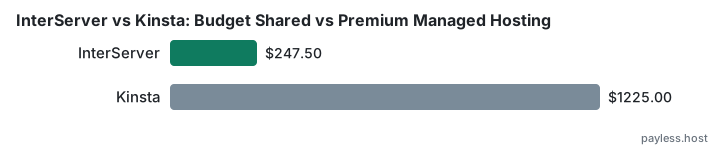
The choice here is between two hosting models
InterServer charges $2.50 for the first month, then $7.00 monthly until you prepay a year or more, reaching $247.50 over three years. Kinsta runs managed WordPress hosting on Google Cloud infrastructure at $30.00 monthly when paid annually, totalling $1,050.00 over three years. One is budget shared hosting with a short introductory rate; the other is premium managed hosting priced for the infrastructure and support desk it includes.
What InterServer costs
Standard Web Hosting starts at $2.50 for one month. From month two, the price becomes $7.00 monthly unless you prepay for a year or longer. The three-year total of $247.50 falls in the middle of what budget shared hosting typically costs, but the $7.00 monthly rate after the intro period is the highest among providers at that level.
The short intro window means you see the long-term price quickly, which removes the uncertainty that comes with longer promotional periods.
What Kinsta costs
Kinsta's entry-level plans — Business Launch and Business Single 20GB — cost $35.00 monthly when paid month-to-month, totalling $1,225.00 over three years. Paying annually drops that to $30.00 monthly (effectively), bringing the three-year total to $1,050.00. Kinsta offers the first month free on certain plans, and nonprofits receive a 15% discount on all monthly or annual plans.
The Agency 20 plan, aimed at agencies managing multiple client sites, costs $284.00 annually with no renewal increase.
What the price difference buys
InterServer operates traditional shared hosting. You share server resources with other accounts, manage your site through a standard control panel, and reach support through tickets.
Kinsta is managed WordPress hosting built on Google Cloud Platform. The company handles server management, security updates, caching, staging environments, and CDN. Support runs through chat and tickets with staff who work specifically with WordPress. Sites sit on isolated containers rather than shared accounts, and Kinsta includes tools like automated backups, malware scanning, and performance monitoring.
The infrastructure and the support desk are what the price pays for. A reader moving a high-traffic site or running client projects is buying time and reliability. A reader launching a personal blog or small business site is paying for features they may never use.
The trade-off each one makes
InterServer keeps the three-year cost low by running traditional shared hosting with minimal management. You configure the environment, handle updates, and troubleshoot issues yourself or through general support. The monthly price after intro is high relative to other budget hosts, but prepaying brings it down.
Kinsta removes server work entirely but charges for that removal. The three-year cost is more than four times InterServer's, reflecting the managed layer and the Google Cloud infrastructure underneath. For a site that generates revenue or serves clients, that cost disappears into operating expenses. For a site that does not, it remains the defining number.
Who each one suits
InterServer works for readers comfortable managing hosting themselves and operating on a tight budget. The short intro period means less surprise at renewal, and prepaying a year eliminates the high monthly rate. It suits personal projects, small business sites with light traffic, and anyone who can handle cPanel and does not need WordPress-specific support.
Kinsta suits readers who need WordPress handled for them — agencies managing client sites, online stores where downtime costs money, membership sites with complex setups, or anyone who would rather pay to remove the server layer entirely. The cost makes sense where time or reliability justifies it, and makes no sense where they do not.