
payless.host
Backups and uptime: what you get, what you pay, what matters
Updated Nov 22, 2026
What backups and uptime actually mean
Backups are copies of your site stored separately from the live version, so a mistake or server failure does not erase everything. Uptime is the percentage of time your site remains accessible — a server that is down for seven hours a year runs at a different uptime level than one down for forty-three minutes.
Most shared hosting includes some form of automatic backup. What varies is how often backups run, how long they are kept, and whether restoring one is a button you press or a support ticket you file. Uptime is harder to parse: every provider aims for high availability, but few shared plans come with a formal guarantee that triggers compensation if the target is missed.
Who needs dedicated backup and uptime provisions
If your site handles transactions, holds user data, or serves as the primary channel for a business, both matter. A backup that runs daily and can be restored without waiting on support means an error made at noon does not cost a day's content. An uptime commitment with financial penalties gives you leverage if the service falls short.
A personal blog or portfolio site has different stakes. Losing a few hours to an outage is inconvenient; losing all content because no backup existed is a different problem. For most non-commercial use, the question is whether backups are included and accessible, not whether uptime is contractually guaranteed.
What backup and uptime features cost
On shared hosting, backups are typically included but not always automatic or frequent. DreamHost includes daily backups on its DreamPress 1 managed WordPress plan at 14.99 EUR per month, rising to 19.99 EUR after twelve months. The cheaper Web Hosting Launch plan at 2.89 EUR per month, renewing at 10.99 EUR, does not publish the same backup schedule — this is the trade-off between a general shared plan and one built for a specific platform.
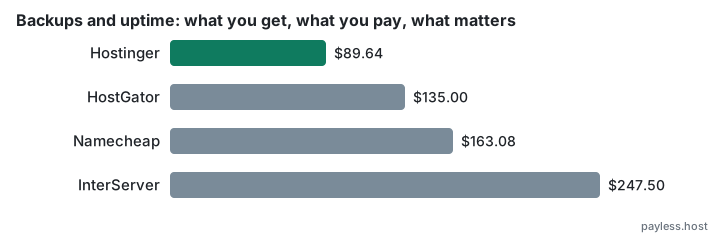
HostGator includes weekly backups on its Hatchling plan at 3.75 USD per month, renewing at 10.99 USD after thirty-six months, and the Baby plan at 4.50 USD per month, renewing at 16.49 USD. The Business plan at 6.25 USD per month, renewing at 21.99 USD, adds more frequent backups and a free domain privacy service for the first year. None of these publish a formal uptime guarantee with compensation.
InterServer charges 2.50 USD for the first month of its Standard Web Hosting, then 7.00 USD monthly unless you prepay a year or more, with a three-year total of 247.50 USD. Backups are included; the documentation does not specify frequency. The monthly renewal rate after the intro period is the highest among the shared hosts reviewed here.
SherlockHost holds at 2.49 GBP per month for its Linux Hosting start plan from signup through year three. Backups are listed as included, but the plan's claims of unlimited resources make it difficult to verify what is actually provided or how backup frequency compares to metered alternatives.
VPS plans separate backup and uptime from the shared-hosting average. DreamHost's VPS Business starts at 13.75 EUR per month, renewing at 31.99 EUR after twelve months, with a three-year total of 932.76 EUR. A VPS gives you control over backup schedules and typically comes with better hardware redundancy, which improves uptime without requiring a separate service-level agreement.
How to choose what you need
Start with how often your site changes and what the cost of losing a day's work would be. A site updated monthly can survive on weekly backups; a site with daily posts or user submissions cannot. Check whether the plan includes automated backups and whether you can trigger or download a backup yourself without filing a ticket.
For uptime, read what happens if the service goes down. A plan that promises high availability but offers no compensation when it fails is a statement of intent, not a contract. VPS or managed WordPress plans are where uptime commitments with financial penalties tend to appear, because the customer paying for them has something at stake.
Do not assume "unlimited" means "comprehensive." A host that advertises unlimited bandwidth and storage but does not specify backup frequency or retention may be prioritising marketing over operations. Namecheap keeps shared hosting costs in the middle range over three years once promos end, but its backup and uptime provisions are not detailed in public documentation — this is common, and it means you must ask before you buy.
The mistakes people make
The most common error is assuming any hosting plan includes backups you can restore yourself. Many do, but not all, and the difference between a backup you can download and one that requires a support ticket is the difference between an hour of downtime and a day of it.
The second mistake is paying for an uptime guarantee on a site that does not need one. If your blog going offline for two hours costs you nothing, the premium you pay for a contractual uptime commitment buys you something you will never use. The inverse is just as common: running a membership site or storefront on a shared plan with no service-level agreement, then discovering during an outage that you have no recourse.
The third is treating all backups as equal. A backup that runs once a week and is kept for a month is not the same as one that runs daily and is kept for three days — the first gives you more history, the second gives you more granularity. Know which matters for your site before you compare plans on price alone.