
payless.host
Website Security and SSL: What It Costs and Who Needs It
Updated Nov 22, 2026
What SSL is and what it does
An SSL certificate encrypts traffic between a visitor's browser and your server. Without it, form submissions, login credentials and payment details travel as plain text. With it, the connection shows a padlock in the address bar and the protocol becomes HTTPS instead of HTTP.
Search engines have penalised HTTP sites since 2014. Most browsers now flag them as "not secure" before a visitor types anything. An SSL certificate removes that warning.
Who needs one and who does not
Any site that asks for information needs SSL. That includes login pages, contact forms, comment sections and anything involving payment. A purely static site with no user input can function without one, but the browser warning usually costs more visitors than the certificate costs to install.
If you run a shop, take bookings, or operate a membership area, SSL is not optional. Payment processors require it and browsers block unencrypted checkout pages outright.
What SSL costs
Most hosting providers include a free certificate with shared hosting plans. These are domain-validated certificates issued through Let's Encrypt or a similar authority, and they do the same job as a paid one for most sites.
Paid certificates start where free ones do not cover the requirement. A wildcard certificate, which secures all subdomains under a single domain, costs more. An extended validation certificate, which shows the company name in the address bar, costs more again. Those run from tens to hundreds yearly depending on the issuer and the validation level.
Email hosting may require separate certificate costs. Namecheap offers Private Email with a free trial at 0.00 USD per month, renewing at 1.24 USD after one month, for a three-year total of 43.40 USD. The base hosting plan does not always include the email certificate.
How hosting plans handle SSL
DreamHost includes SSL on its Web Hosting Launch plan at 2.89 EUR per month, renewing at 10.99 EUR after twelve months. The managed WordPress tier, DreamPress 1, costs 14.99 EUR monthly and renews at 19.99 EUR, with SSL included on both.
HostGator provides SSL across its shared hosting range. The Hatchling plan costs 3.75 USD monthly and renews at 10.99 USD after thirty-six months. The Business plan, at 6.25 USD per month renewing at 21.99 USD, adds domain privacy for the first year at no charge.
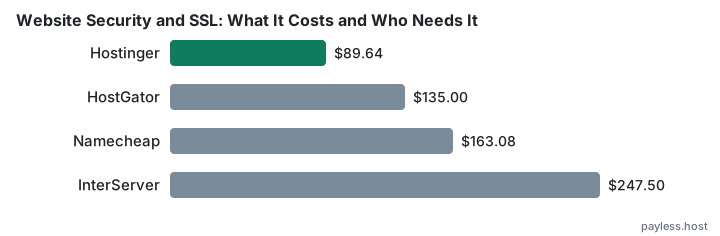
InterServer includes SSL on Standard Web Hosting at 2.50 USD for the first month, then 7.00 USD monthly unless you prepay a longer term. The three-year total is 247.50 USD.
SherlockHost supplies SSL on all Linux and Windows hosting plans. Linux Hosting start costs 2.49 GBP per month at signup and renewal, the same price through year three.
SSL is infrastructure rather than an add-on at this point. A provider charging separately for it is charging for something competitors include.
Choosing the right certificate type
A domain-validated certificate checks that you control the domain. It issues in minutes and covers the vast majority of use cases. If the site is a standard blog, portfolio, or small business front, this is what you need.
A wildcard certificate secures the main domain and every subdomain beneath it. That matters if you run separate subdomains for a shop, a support portal, and a members area, but not if everything lives at www. It costs more and the free hosting-bundled certificate will not cover it.
An organisation-validated certificate checks that your business exists. An extended validation certificate requires proof of legal and physical existence and shows the company name in the browser. Banks and payment processors use these. Almost nobody else needs them, and the difference in browser behaviour has narrowed to the point where the expense is hard to justify unless compliance requires it.
Common mistakes
Installing SSL but not forcing HTTPS leaves the site accessible on both protocols. A visitor who types the domain without the protocol lands on HTTP, and the certificate does nothing. The fix is a redirect rule in the server configuration or the CMS settings.
Mixed content warnings appear when an HTTPS page loads images, scripts or stylesheets over HTTP. Browsers block the insecure resources and the page breaks. Every asset reference needs to use HTTPS or a protocol-relative path.
Letting a certificate expire brings the site down harder than not having one at all. Browsers block access entirely rather than showing a warning. Hosting-bundled certificates renew automatically. Paid certificates require manual renewal unless the provider offers auto-renewal, and not all do.
Choosing a paid certificate when the free one does the job is the commonest mistake. Unless you need wildcard coverage, organisation validation, or a warranty that matters to your compliance regime, the included certificate is the right choice.