
payless.host
Website Builders and AI Site Tools: What They Cost and How to Choose
Updated Nov 22, 2026
What website builders and AI site tools are
A website builder is software that lets you create a site without writing code. You work through a visual editor, drag components into place, and publish. AI site tools take this further: describe what you want and the tool generates layout, text, and images as a starting point you can edit.
Both exist to remove the technical work. A business that needs a site online quickly, or a person without development skills, trades some control for speed and simplicity. The trade-off is real: what you gain in convenience you give up in flexibility, and what looks like a cheap monthly fee often becomes expensive once you add the features a working site needs.
Who needs one and who does not
A website builder suits a business that needs a straightforward site now and does not plan to change structure often. A portfolio, a restaurant menu, a small shop, an appointment booking page — all fit the model. The site goes live in hours rather than weeks, and someone without technical staff can make updates.
AI tools narrow the use case further. They are fastest when the site fits a template the tool already knows: a consultant's landing page, a local service business, a product showcase. Describe the business, choose a style, and the tool delivers a usable first draft. The time saved is largest when the site is simple and the content is generic.
A website builder is the wrong tool when the site needs to do something the builder was not designed for. Custom checkout flows, membership systems, third-party integrations that are not in the template library — all push against the limits of what a drag-and-drop interface can express. A business that knows it will need those things later pays twice: once for the builder, again to rebuild on a platform that supports what the builder could not.
What it costs
Pricing for website builders is not usually structured the way hosting is. Most tools charge a single monthly or annual rate that does not change, and the cost is determined by which features are included in the plan rather than by an introductory discount that expires.
The facts available here are for hosting providers that include site-building tools alongside traditional hosting. SherlockHost charges £2.49 per month for its Website Builder plan, and that price does not change at renewal. Namecheap does not list a standalone builder product in the pricing above, though it offers domain registration starting at 0.98 USD per year for a .online domain that renews at 2.88 USD.
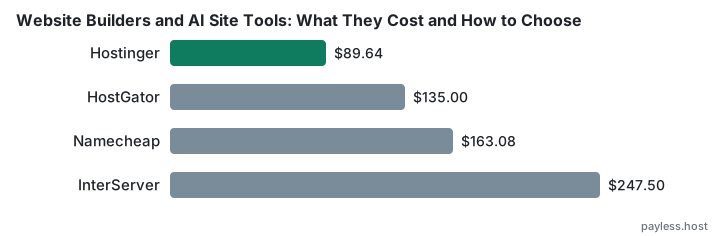
Hosting that includes a builder as part of the package follows the two-stage pricing this site exists to document. DreamHost charges 2.89 EUR per month for Web Hosting Launch, rising to 10.99 EUR after twelve months — a three-year total of 298.44 EUR. HostGator starts at 3.75 USD per month on the Hatchling plan, renewing at 10.99 USD after thirty-six months, for a three-year total of 135.00 USD. Hostinger is among the cheapest hosting worth having, provided a four-year commitment suits you and you have planned for the renewal rate.
Where a builder is sold separately from hosting, the pricing is usually transparent and the cost is predictable. Where it is bundled with hosting, the price of the package rises in the same way shared hosting does, and the three-year cost can be two or three times the advertised monthly rate.
How to choose
Start with what the site must do, not what the tool can do. List the pages, the forms, the integrations. A tool that does everything is a tool you are paying for features you will not use. A tool that does less than you need will force a migration later, and migrations are where the low monthly price stops looking cheap.
Check what is included at the advertised price and what costs extra. Email, storage, custom domains, removing the builder's branding — most builders charge separately for at least one of those. A $10 plan that includes everything you need is cheaper than a $5 plan that charges $3 each for three features you cannot do without.
Look at how you get content out if you leave. Some builders export to standard formats; others lock everything inside their platform. A business that might outgrow the tool in two years should know whether it will be starting from scratch when it does.
The mistakes people make
The first mistake is choosing based on the template gallery. A template that looks right is worth less than a platform that supports the features you will need in six months. Design is easier to change than structure.
The second is underestimating how much a site will grow. A five-page site becomes a fifteen-page site once you add the blog, the case studies, the FAQ. A builder that feels simple at five pages can feel limiting at fifteen, and by then you have content and search rankings that make moving expensive.
The third is paying monthly when annual is cheaper, or paying for annual when the site is still an experiment. If you are certain the site will exist in a year, pay annually. If you are not certain, pay monthly until you are. The discount on annual billing only saves money if you use all twelve months.
The fourth mistake is not reading the export terms before you need them. The time to learn that your content cannot be moved is before you have built a year's worth of pages, not after.