
payless.host
Moving to a New Host: What It Costs and How to Choose
Updated Nov 22, 2026
What Migration Is
Moving to a new host means transferring a website from one hosting provider to another. Files, databases, email accounts, and DNS records all move to a different server, ideally with no downtime and nothing lost.
Some providers include migration in the price. Others charge separately. Some expect you to do it yourself.
Who Needs It
Anyone leaving a current host for a new one. That includes people whose renewal price has become too high, those outgrowing shared hosting, and anyone whose current provider no longer meets their needs.
A site already on WordPress may need less work than a custom-built platform. A site with complex integrations or a large database takes longer than a basic blog. The size of the job determines whether the included service is enough or whether paid help is required.
Who Does Not
Someone buying hosting for the first time has nothing to move. Someone registering a domain and pointing it at a new site builds in place rather than migrates.
A person running a single static page can usually copy it across in minutes. The complexity of the site determines whether migration is a project or a formality.
What It Costs
Many shared hosting plans include one free migration. DreamHost includes it on both the 2.89 EUR/month Web Hosting Launch plan and the 14.99 EUR/month DreamPress 1 managed WordPress plan. HostGator includes it across its range, from the 3.75 USD/month Hatchling plan upward.
Where migration is not included, expect to pay separately. Some providers charge per site. Others offer it as an add-on service priced by the hour. A straightforward WordPress transfer might take an hour; a site with custom code, third-party integrations, and a multi-gigabyte database can take much longer.
Doing it yourself costs nothing beyond time. Hiring a migration specialist outside the hosting company typically costs more than the host's own service, but may be necessary for unusual setups.
How to Choose
Start with whether the new host offers migration at all. Then confirm what is covered: one site or several, databases and email or files only, WordPress-specific tools or manual transfer.
A provider that includes migration and charges the same price every month is simpler to budget for. SherlockHost charges 2.49 GBP/month on its Web Hosting plan and does not raise the price at renewal. Hostinger does not list traditional shared hosting in the data provided here, but where a price is the same at renewal, there is no second-term surprise.
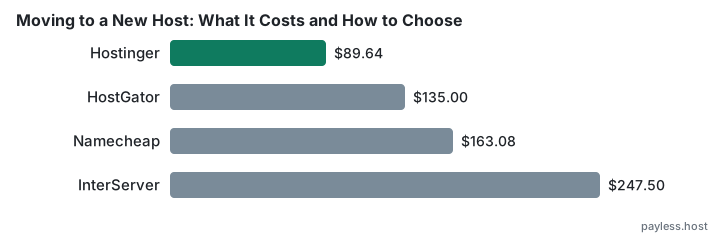
Where a provider charges one price initially and another later, calculate what three years costs, not just the first term. DreamHost's Web Hosting Launch plan costs 2.89 EUR/month, renews at 10.99 after twelve months, and totals 298.44 EUR over three years. HostGator's Hatchling plan costs 3.75 USD/month, renews at 10.99 after thirty-six months, and totals 135.00 USD over three years. The difference between those totals is larger than the difference between the headline prices.
If migration is charged separately, add that cost to the first year's total. A provider with a slightly higher monthly rate but included migration may cost less than one with a lower rate and a migration fee.
Mistakes People Make
The first mistake is assuming migration is always free. It often is on shared hosting, less often on VPS or dedicated servers, and rarely when moving from a heavily customised platform.
The second is not checking what happens to email. Moving a website does not always move the mailboxes. DNS records need updating, and if email is hosted separately from the site, those records must point to the right place. A migration that overlooks email can leave a business unreachable for days.
The third is migrating to a plan that cannot support the site. A host that offers free migration onto its cheapest tier may not mention that the cheapest tier has resource limits the old host did not. Test the new environment with a copy of the site before switching DNS.
The fourth is not keeping a backup under your own control. A migration service may copy everything across, but if something goes wrong after DNS has switched, you need a backup that is not on either the old host or the new one.
The fifth is choosing a new host based only on the first-term price. InterServer charges 2.50 USD/month for one month, then 7.00 until you prepay a year or more, for a three-year total of 247.50 USD. That total is mid-table, but the monthly price after the intro period is the highest in this comparison. A low entry price is only useful if the renewal price is sustainable.
What to Ask Before You Move
Ask what is included in the migration service. Ask whether DNS changes are handled or whether you make them. Ask how long the process takes and whether there is any expected downtime. Ask what happens if something goes wrong.
Ask how billing works if you are moving mid-term from a host you have already paid. Some old hosts refund unused months; most do not. Budget for overlap if you need to keep both hosts live while testing.
Ask whether the new host has a rollback plan. If the migration fails, can you revert, or is the old environment already gone?